
Collage maker
A collage maker for photo dumps that look designed.
Pick a layout, drop in your photos and finish with text, stickers and filters. Make collages for Instagram stories, feed posts, TikTok slides and wallpapers, free to start.
- 2 to 9 photos
- 1:1, 4:5 and 9:16
- Free to start
- Text and stickers
- Filters built in
4.8 stars on the App Store · Available on iOS & Android
What is a collage maker
A collage maker puts several photos into one layout you can post as a single image.
Zaps is a photo collage maker for iPhone, Android and the web. Choose a layout, add two to nine photos, then change the text, colors, frames and filters. Export it sized for an Instagram story, a feed post or a TikTok slide.
Best for
Photo dumps, stories, moodboards, wallpapers
Photos per collage
2 to 9
Sizes
1:1, 4:5, 9:16 and custom
Price
The collage maker is on the Free plan
Why collages go wrong
Most collages look like a camera roll dropped into a grid.

Layouts
Start from a layout, not a blank grid.
Spacing, crops and proportions are already worked out. Drop a photo into any frame and drag to choose the crop.
- Grids for photo dumps and recaps
- Layered scrapbook looks
- Square, 4:5 and 9:16 sizes
- Moodboard and wallpaper layouts

Templates
Aesthetic templates for trips, birthdays and everyday posts.
Templates arrive styled, with spacing, type and background done. Replace the sample photos with yours and change the words.
- Travel, birthday, fashion and lifestyle
- Minimal, scrapbook and editorial styles
- Product and promo collages for businesses
- Edit in your browser or in the iOS and Android app
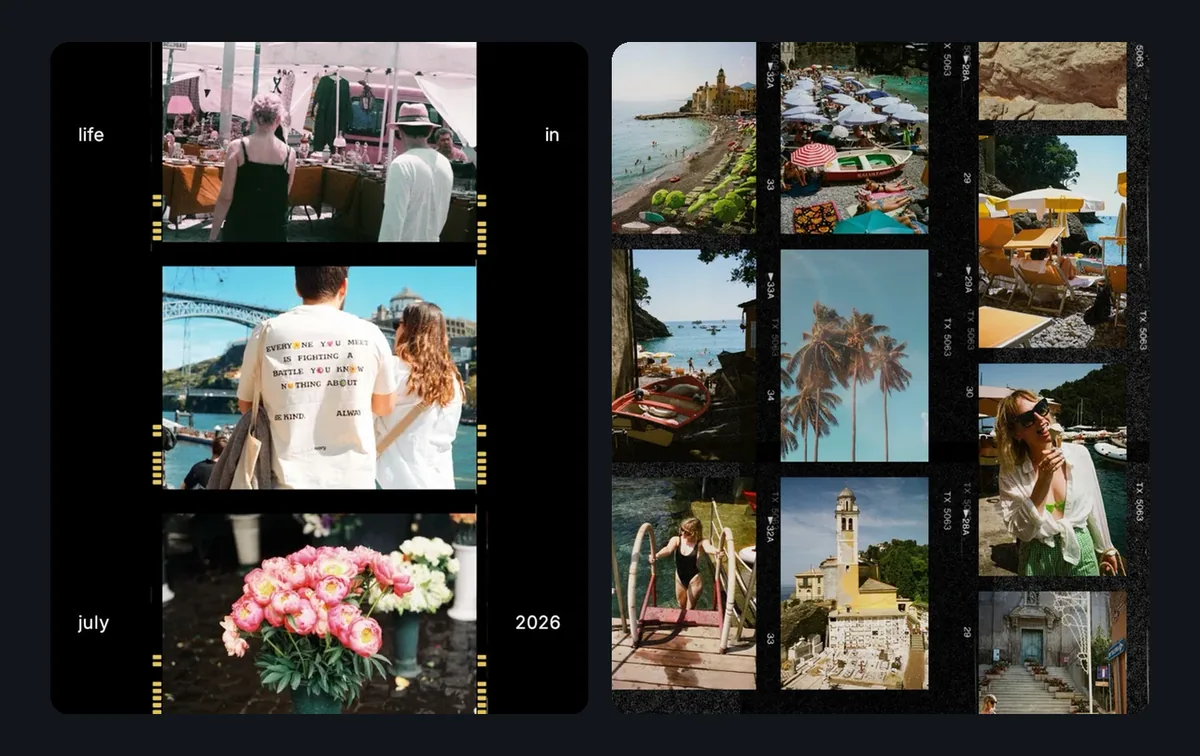
Film and scrapbook
Film strips, frames and borders.
A frame gives a pile of photos a shape. Use a film strip for a recap, or a scrapbook edge for a softer look, then add a caption, a date or a label.
- Film-style frames
- Scrapbook edges and borders
- Captions, dates and labels
- Premium fonts, stickers and frames come with Pro
Finish in one place
Match the photos, then rescue the weak ones.
Apply the same filter to each photo so mixed lighting reads as one set. On Pro, AI Enhance, Background Remover and Magic Eraser fix the shots that need help before they go in.
- Film-inspired and vintage filters
- The same filter on every photo
- AI Enhance (Pro)
- Background Remover and Magic Eraser (Pro)
Use cases
A collage for every kind of post.
Instagram stories
Birthdays, trips and daily updates in one 9:16 layout.
Photo dumps
Turn a week, a trip or an event into one tidy multi-photo post.
Moodboards
Collect outfits, interiors, colors or references on one canvas.
Wallpapers
Set your favorite photos, a quote and a few stickers as a phone wallpaper.
Business promos
Combine product shots, an offer and a price in one promotional collage.
Invites and events
Put the guest of honor, the date and the details on one image.
How it works
Make a collage in four steps.
1
Choose a layout
Open a collage template that fits your format and mood.
2
Add your photos
Swap the sample images for yours and drag each one to the crop you want.
3
Style it
Change the text, then add filters, stickers, frames or a caption.
4
Export and post
Save it sized for an Instagram story, a feed post or a TikTok slide.
Why Zaps
More than a grid of squares.
Basic collage apps
- A short list of fixed grids
- Generic borders and backgrounds
- Filters and text live in other apps
- Collages that look like everyone else’s
Zaps Collage Maker
- Aesthetic templates for stories, posts and wallpapers
- Layouts for 2 to 9 photos
- Fonts, stickers and frames in the same editor
- Filters and effects built in
- AI photo tools on Pro
- Works in your browser and in the iOS and Android app
More from Zaps
Keep building with Zaps.
What people say
Loved by people who make collages.
"I used to make collages in one app, edit photos in another, and add text somewhere else. Zaps puts the whole workflow in one place."
@lifestyle.creator
"The templates make my photo dumps look like they were designed, not just thrown together."
@dailyphotojournal
"I love using Zaps for story collages. It is fast, clean and way more aesthetic than the basic collage apps I tried."
@moodboard.studio
Frequently asked questions
Open a collage template, replace the sample photos with yours, adjust the text and filters, then export. Use 9:16 for a story, or 4:5 or 1:1 for a feed post.
Two to nine photos in one layout. For a bigger photo dump, spread the pictures across the slides of a carousel.
Instagram stories and TikTok slides are 9:16 (1080 by 1920 pixels). Feed posts work at 4:5 or 1:1. Zaps exports all three and custom sizes.
Yes, the collage maker is on the Free plan. Pro ($49.99/year or $5.99/week) adds premium fonts, stickers and frames, AI photo tools and watermark-free HD exports.
Yes. Add text in any font, then layer stickers, icons, frames and labels on top. Premium fonts, stickers and frames need Pro.
Yes. Collage templates open in the Zaps editor in your browser. Zaps is also available on iOS and Android.
Your next photo dump, laid out.
Choose a collage template, add your photos and post it today.